

Basic Fundamentals of Design in 2026
What is Design?
Design is not just about making things look good. That’s the biggest misconception beginners have. Excellent design solves problems. It communicates ideas clearly. It guides people without them even noticing. Think about a website you enjoy using. You don’t struggle. You don’t feel confused. That’s the design working silently in the background.
In simple terms, design is the process of planning and creating visual content to communicate a message. It can be a poster, a website, an app, or even a simple social media post. Every element you see has a purpose. The color, the spacing, the text, everything is intentional.
Beginners often jump straight into tools like Photoshop or Figma. That’s a mistake. Tools don’t make you a designer. Understanding fundamentals does. Without fundamentals, your work will look random, inconsistent, and amateur. With fundamentals, even simple designs look clean and professional.
Why Design Matters
Design is everywhere. You interact with it every day without realizing it. From the phone in your hand to the app you use, everything has been designed with intention. Effective design makes things easy. Poor design creates frustration.
Imagine opening a website where text is too small, colors are harsh, and buttons are confusing. You leave instantly. That’s poor design. Now think of a clean, simple website where everything is easy to find. You stay longer. That’s effective design.
Businesses rely heavily on design. A well-designed brand builds trust. A poorly designed one looks unprofessional. This directly affects sales, engagement, and user experience. Design is not decoration. It’s a business tool.
Core Principles of Design
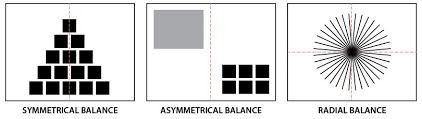
1. Structuring Visual Stability
Balance ensures that a design feels stable and organized. We use three main types:
- Symmetrical balance: Equal weight on both sides, often used in formal layouts
- Asymmetrical balance: Different elements balanced through contrast
- Radial balance: Elements arranged around a central point
A poorly balanced design creates discomfort. A well-balanced design builds trust instantly.
Basic Fundamentals of Design in 2026: This blog only covers fundamentals of design in the future; more details will be provided soon, blogs.
2. Contrast: Creating Visual Impact
Contrast is what makes elements stand out. Without it, everything blends into noise.
We achieve contrast through:
- Color (light vs dark)
- Size (large vs small)
- Typography (bold vs thin)
- Shape (geometric vs organic)
Strong contrast guides the viewer’s attention. Weak contrast kills clarity.
Basic Fundamentals of Design in 2026: This blog only covers fundamentals of design in the future; more details will be provided soon, blogs.
3. Hierarchy: Controlling Attention Flow
Hierarchy determines what users see first, second, and third. This is critical in modern UI/UX and content design.
We establish hierarchy using the following:
- Size scaling
- Color emphasis
- Spacing
- Positioning
If everything looks important, nothing is important. Clear hierarchy removes confusion.
Basic Fundamentals of Design in 2026: This blog only covers fundamentals of design in the future; more details will be provided soon, blogs.
4. Alignment: Creating Order
Alignment is about placing elements in a structured way. Random placement signals amateur work.
We align elements:
- Along grids
- With consistent margins
- Based on visual flow
Clean alignment improves readability and professionalism.
5. Repetition: Building Consistency
Repetition reinforces identity. It ensures that the design feels cohesive.
We repeat:
- Colors
- Fonts
- Layout patterns
- Icons
Consistency builds recognition. Inconsistent design breaks trust.
Basic Fundamentals of Design in 2026: This blog only covers fundamentals of design in the future; more details will be provided soon, blogs.
6. Proximity: Grouping Information Logically
Proximity organizes content into meaningful clusters.
When elements are close together, users assume they are related. When spaced apart, they feel separate.
This principle is critical in:
- UI layouts
- Infographics
- Typography spacing
Good proximity reduces cognitive load.
Basic Fundamentals of Design in 2026: This blog only covers fundamentals of design in the future; more details will be provided soon, blogs.
8. White Space: Designing with Breathing Room
White space is not empty space. It is functional space.
We use it to:
- Improve readability
- Highlight key elements
- Reduce clutter
Crowded design overwhelms users. Space creates clarity.
9. Color Theory in 2026 Design
Color is one of the most powerful tools in design. It influences emotion, perception, and action.
Understanding Color Psychology
Each color communicates a message:
|
We choose colors based on intent, not preference.
Modern Color Trends
In 2026, we see:
- Muted palettes with high-contrast accents
- Dark mode-first designs
- Gradient overlays with subtle transitions
We avoid overly saturated palettes unless the brand demands it.
Basic Fundamentals of Design in 2026: This blog only covers fundamentals of design in the future; more details will be provided soon, blogs.
10. Typography: The Backbone of Communication
Typography is not decoration. It is structure.
Choosing the Right Typeface
We focus on:
- Readability
- Scalability
- Brand alignment
Modern design favors the following:
- Clean sans-serif fonts
- Variable fonts for flexibility
- Minimal font combinations (2–3 max)
Typography Hierarchy
We structure text using:
- Headings (H1, H2, H3)
- Body text
- Captions
Clear typography hierarchy ensures effortless reading.
11. Spacing and Line Height
Poor spacing ruins good typography.
We maintain:
- Adequate line height (1.4–1.6)
- Proper letter spacing
- Consistent margins
12. Layout Systems and Grid Design
Grids are the foundation of modern design systems.
Why Grids Matter
Grids provide:
- Structure
- Consistency
- Scalability
Without grids, layouts feel chaotic.
Popular Grid Systems in 2026
- 12-column grid for web design
- Modular grids for complex layouts
- Responsive grids for mobile-first design
We design for flexibility across devices.
User Experience (UX) as a Core Principle
Design today is driven by user experience.
Understanding User Behavior
We analyze:
- How users interact
- Where they drop off
- What they expect
Design decisions are based on data, not assumptions.
Key UX Principles
- Simplicity over complexity
- Speed over decoration
- Accessibility for all users
If users struggle, the design fails.
Accessibility in Design
Accessibility is no longer optional. It is essential.
We ensure:
- Sufficient color contrast
- Readable font sizes
- Keyboard navigation support
- Screen reader compatibility
Inclusive design expands reach and improves usability.
13. The Role of AI in Design (2026)
AI has transformed how we design.
How We Use AI
- Generating layout variations
- Automating repetitive tasks
- Enhancing image quality
- Predicting user behavior
AI speeds up execution, but human judgment defines quality.
What AI Cannot Replace
- Creative direction
- Emotional understanding
- Strategic thinking
We use AI as a tool, not a replacement.
Basic Fundamentals of Design in 2026: This blog only covers fundamentals of design in the future; more details will be provided soon, blogs.
14. Visual Trends Shaping Design in 2026
Minimalism with Purpose
Minimalism is no longer about removing elements blindly. It is about removing distractions.
Bold Typography
Large, expressive typography dominates modern layouts.
Micro-Interactions
Subtle animations improve engagement:
- Hover effects
- Button feedback
- Scroll transitions
These details enhance usability.
3D and Depth Elements
Design now incorporates:
- Soft shadows
- Layered elements
- 3D illustrations
Flat design alone is outdated.
Common Design Mistakes to Avoid
Overloading the Layout
Too many elements create confusion. Focus on clarity.
Ignoring Hierarchy
Without hierarchy, users cannot navigate content.
Poor Color Choices
Clashing colors reduce readability and professionalism.
Inconsistent Design Language
Switching styles mid-design breaks user trust.
Neglecting Mobile Experience
Design must work seamlessly across devices.
Building a Strong Design System
A design system ensures consistency across projects.
We include:
- Color palette
- Typography rules
- Component library
- Grid system
This allows scalable and efficient design.
Basic Fundamentals of Design in 2026: This blog only covers fundamentals of design in the future; more details will be provided soon, blogs.
Conclusion: Mastering the Fundamentals
The fundamentals of design remain the backbone of all creative work. In 2026, tools have evolved, trends have shifted, and expectations have grown, but the core principles still define success.
We focus on:
- Clarity over decoration
- Function over complexity
- Consistency over randomness
Master these fundamentals, and every design we create will communicate effectively, look professional, and perform with purpose.




I LIKE THIS POST