The Evaluation of Photoshop (1990–2026)
Introduction to Photoshop
Photoshop is one of the most popular computer programs in the world. It is mainly used to edit photos, create designs, and improve images. From school students to professional designers, many people use Photoshop every day. Even movie posters, advertisements, and social media images are often made using Photoshop.
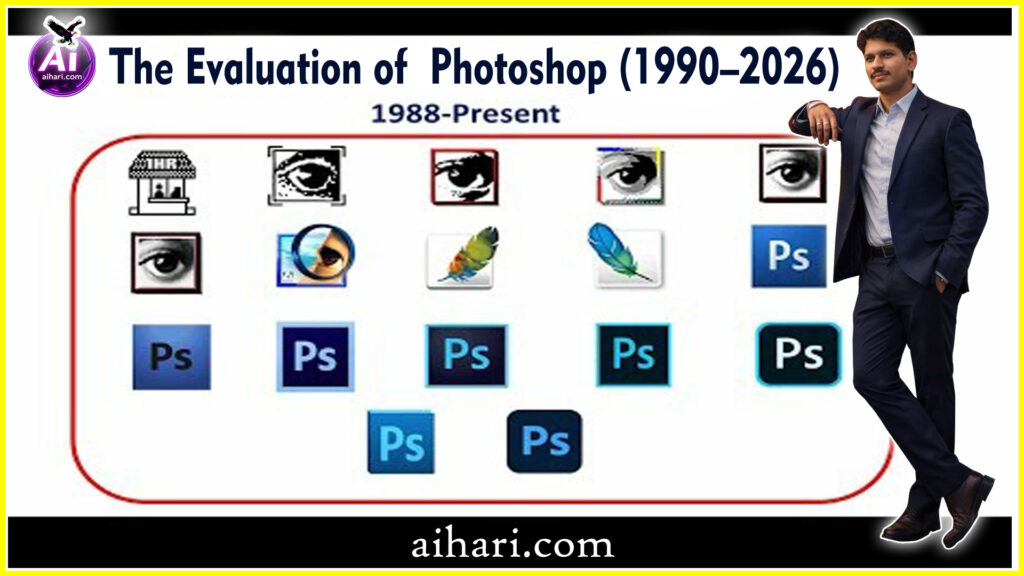
Photoshop did not become powerful overnight. It slowly grew over many years.
The Evaluation of Photoshop (1990–2026) article explains the journey of Photoshop from its beginning to the year 2026.
Why Photoshop Is Important
Photoshop helps people turn their ideas into images. A simple photo can be made brighter, sharper, and more attractive. Old photos can be repaired. Drawings can be colored. Designs can be created for books, websites, and videos. Because of this, Photoshop is an important tool in modern life.
The Birth of Photoshop
Who Created Photoshop
Photoshop was created by two brothers, Thomas Knoll and John Knoll. Thomas was good at computer programming, and John worked with visual effects. They wanted to make a program that could edit images on a computer. Their idea later became Photoshop.
Photoshop Version 1.0
The first version of Photoshop was released in 1990. It was very simple compared to today. It could only do basic tasks like adjusting brightness and contrast. It worked only on Macintosh computers. Still, it was a big step in digital image editing.
Brightness and Contrast
1. Brightness
Brightness refers to the overall lightness or darkness of an image.
* When you increase it: Every pixel in the image gets lighter. It’s like turning up the lights in a room.
* When you decrease it: Every pixel gets darker. It’s like dimming the lights.
* Goal: You adjust brightness to make the screen visible depending on the lighting around you (e.g., increasing it under direct sunlight).
2. Contrast
Contrast is the difference between the darkest and lightest areas of an image.
* High Contrast: The blacks look deeper and the whites look brighter. This makes the image look “sharp,” and the objects stand out clearly.
* Low Contrast: The difference between light and dark is small, making the image look “flat,” dull, or grayish.
* Goal: You adjust contrast to make the details in a photo pop and to add depth to the visual.
The Evaluation of Photoshop (1990–2026) blog will continue. with next features available in next blogs
Photoshop in the 1990s
Early Tools and Features
In the 1990s, Photoshop slowly added new tools. Cropping, painting, erasing, and simple filters became available. These tools helped photographers and designers save time. Before Photoshop, most image work was done by hand.
Use in Print and Photography
During this time, Photoshop became popular in magazines and newspapers. Editors used it to fix photos before printing. This made printed images look cleaner and more professional.
The Evaluation of Photoshop (1990–2026) blog will continue. with next features available in next blogs
Year-by-Year Evaluation of Photoshop (1990–1999)
1990
Photoshop 1.0 is released for Macintosh.
It can adjust brightness and contrast. No layers. Very basic.
1991
Minor updates improve stability.
Used mostly by researchers and photographers.
1992
Photoshop 2.0 adds support for color images.
This makes it useful for print work.
1993
The Paths tool is introduced.
Users can draw clean shapes and outlines.
1994
Photoshop 3.0 introduces layers.
This is a turning point. Editing becomes flexible and safe.
1995
Adjustment layers improve color control.
Designers gain more accuracy.
1996
Text layers are added.
Photoshop starts being used for posters and ads.
1997
The history panel is introduced.
Users can undo multiple steps.
1998
Photoshop 5.0 adds layer effects like shadows.
Design work becomes faster.
1999
The magnetic lasso tool improves selection accuracy.
Photo editing becomes easier.
The Evaluation of Photoshop (1990–2026) blog will continue. with next features available in next blogs
Photoshop in the 2000s-2009s
Digital Cameras Change Everything
In the early 2000s, digital cameras became common. People started taking photos without film. Photoshop became the best software to edit these digital photos. Color correction and red-eye removal became very useful.
New Editing Possibilities
Layers were improved during this time. Layers allowed users to edit parts of an image without changing the whole picture. This was like working on transparent sheets stacked on each other. It made editing safer and smarter.
2000
Photoshop 6.0 improves interface design.
Web designers begin using it more.
2001
Photoshop 7.0 introduces the Healing Brush.
Photo retouching becomes more natural.
2002
A file browser improves image management.
Large projects become easier to handle.
2003
Photoshop CS is launched.
Better performance and workflow tools.
2004
Photoshop CS2 adds Smart Objects.
Images can be resized without losing quality.
2005
Red-eye removal improves portrait editing.
Digital photography grows fast.
2006
The Vanishing Point tool helps with perspective edits.
Used in architecture and product design.
2007
Photoshop CS3 runs faster and supports more formats.
Professional use increases.
2008
Better 3D tools are added.
Photoshop enters basic 3D design.
2009
Photoshop CS4 introduces smoother zoom and rotation.
Editing feels more natural.
The Evaluation of Photoshop (1990–2026) blog will continue. with next features available in next blogs
Photoshop in the 2010s-2019s
Smart Tools and Automation
In the 2010s, Photoshop added smart tools. These tools could automatically select objects, fix lighting, and adjust colors. Editing became faster and easier. Even beginners could get good results.
Photoshop for Social Media
Social media platforms became popular. Photoshop helped people create eye-catching images for posts, banners, and thumbnails. Content creators used it daily.
2010
Photoshop CS5 adds Content-Aware Fill (early version).
Removing objects becomes easier.
2011
The liquify tool improves face and body edits.
Portrait editing grows.
2012
Photoshop CS6 improves speed and UI.
Last version before subscription model.
2013
Photoshop CC launches with cloud support by Adobe.
The subscription model starts.
2014
Focus on performance and camera raw tools.
Better photo clarity.
2015
Face detection improves selections.
Editing people becomes faster.
2016
The Select and Mask workspace is added.
Hair and edges are easier to cut out.
2017
Search inside tools and panels is introduced.
Beginners find tools faster.
2018
Content-Aware Fill becomes more accurate.
Less manual fixing needed.
2019
Photoshop for iPad is released.
Mobile editing begins seriously.
The Evaluation of Photoshop (1990–2026) blog will continue. with next features available in next blogs
Introduction of AI in Photoshop
What Is Artificial Intelligence
| “Artificial intelligence,” or “AI,” means machines that can think and learn like humans. In Photoshop, AI helps the software understand images better. |
AI-Based Editing Tools
AI tools can now remove backgrounds with one click. Faces can be smoothed automatically. Objects can be selected very quickly. These tools save a lot of time and effort.
The Evaluation of Photoshop (1990–2026) blog will continue. with next features available in next blogs
Photoshop During 2020–2024
Content-Aware and Neural Filters
Content-aware tools can fill empty spaces in photos by guessing what should be there. Neural filters can change facial expressions, age, or lighting. These tools feel almost magical.
Cloud and Mobile Versions
Photoshop became available on mobile phones and tablets. Cloud storage allowed users to work on projects from anywhere. This made Photoshop more flexible.
The Evaluation of Photoshop (1990–2026) blog will continue. with next features available in next blogs
Photoshop in 2025–2026
Generative AI and Smart Design
By 2025 and 2026, Photoshop had become even smarter. Generative AI allows users to create images from text. For example, typing a sentence can create a full image. This is a big change in creativity.
Easy Editing for Beginners
Photoshop now guides beginners step by step. Simple menus, tutorials, and auto-fix options make learning easy. Students can start editing without fear.
2025
Photoshop adds guided AI editing.
Beginners get step-by-step help.
2026
Photoshop focuses on full AI creativity.
Text-to-design, auto layouts, and smart corrections become standard.
Final Evaluation
Photoshop started as a simple image editor in 1990.
Year by year, it added tools that solved real problems.
The biggest changes were:
- 1994: Layers
- 2010: Content-Aware Fill
- 2020+: AI and Generative tools
By 2026, Photoshop is no longer just an editor.
It is a creative system that helps anyone turn ideas into images.
Photoshop for Students and Beginners
Learning Made Simple
Photoshop offers built-in lessons. Students can practice drawing, coloring, and photo editing. It helps improve computer skills.
Creative Skills Development
Using Photoshop builds creativity. Students learn how colors, shapes, and light work together. These skills are useful in many careers.
Advantages of Photoshop
Photoshop is powerful and flexible. It offers many tools in one place. It works for photos, art, and design. Regular updates keep it modern.
Limitations of Photoshop
Photoshop needs a good computer. It can be expensive. Beginners may feel confused at first. Practice is required to master it.
The Evaluation of Photoshop (1990–2026) blog will continue. with next features available in next blogs
Future of Photoshop
Photoshop will continue to grow. AI will become more helpful. Editing will become faster and more natural. In the future, anyone may be able to create professional images easily.
Conclusion
Photoshop started as a small image editing program in 1990. Over the years, it became the most powerful design tool in the world. From simple photo fixes to AI-generated images in 2026, Photoshop has changed how we create and see images. It is not just software. It is a creative partner for students, artists, and professionals. The Evaluation of Photoshop (1990–2026) blog will continue. with next features available in next blogs
FAQs
- What is Photoshop used for?
Photoshop is used to edit photos, create designs, and improve images. - Who invented Photoshop?
Photoshop was created by Thomas Knoll and John Knoll. - Is Photoshop good for students?
Yes. It helps students learn creativity and digital skills. - What is AI in Photoshop?
AI helps Photoshop edit images automatically and intelligently. - Will Photoshop be useful in the future?
Yes. With AI and smart tools, Photoshop will become even more useful.