
Adobe Photoshop 7.0—A Simple and Complete Guide in 2026
Introduction
Before going to PS-2026, we must know about Adobe Photoshop 7.0. Adobe Photoshop 7.0 is one of the most popular and important photo-editing software versions in computer history. Even today, many beginners and students like Photoshop 7.0 because it is simple, fast, and easy to use. Adobe Photoshop 7.0—A Simple and Complete Guide in 2026 from aihari.com explains Photoshop 7.0 in very simple English, so every person can understand it.
System Requirements and Installation
Adobe Photoshop 7.0 has very minimum system requirements, which makes it for beginners.
Basic Requirements:
-
Windows 98/2000/XP
-
128 MB RAM (256 MB recommended)
-
300 MB free disk space
-
Basic graphics display
Why Learn Photoshop 7.0 in 2026
Adobe Photoshop 7.0—A Simple and Complete Guide in 2026 says
Why? Because the answer is simple: fundamentals never expire.
1. Strong Basics
Photoshop 7.0 teaches you manual editing, not automatic AI shortcuts. This helps you understand how photo editing actually works.
2. Easy for Beginners
The interface is simple and not confusing. Beginners feel comfortable learning step by step.
3. Works on Low-End Computers
You don’t need the most powerful computer. Photoshop 7.0 runs smoothly on older systems.
4. Skills Never Get Old
Tools like layers, selection, brushes, and color correction work the same way even in modern Photoshop.
Understanding the Photoshop 7.0 Interface
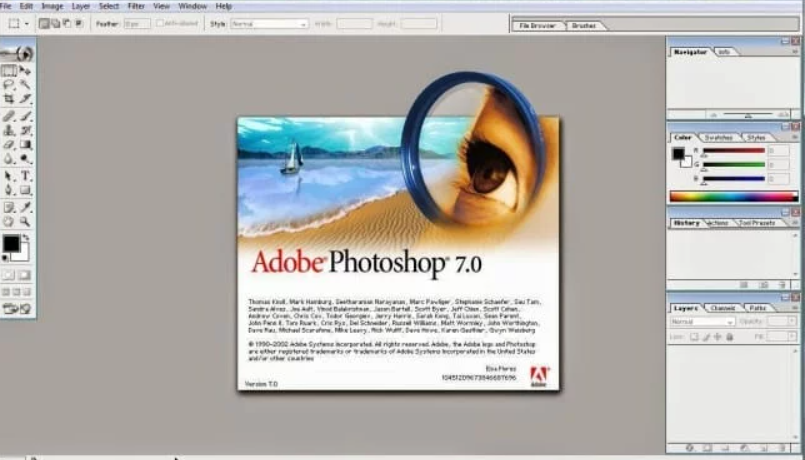
When you open Photoshop 7.0, you will see a clean screen.
Understanding the Photoshop 7.0 Interface
When you open Photoshop 7.0, you will see a clean screen.
Menu Bar
At the top, you will find:
- File
- Edit
- Image
- Layer
- Select
- Filter
Each menu controls different actions like saving files, editing images, or adding effects.
Adobe Photoshop 7.0 – A Simple and Complete Guide in 2026 will give more information about this more later.
Toolbox
The toolbox is on the side. It contains:
- Selection tools
- Brush tool
- Eraser tool
- Text tool
- Shape tools
These are the tools you use every day.
Adobe Photoshop 7.0—A Simple and Complete Guide in 2026 will be discussed in later blogs…
Layers Panel
Layers help you edit parts of an image separately.
Think of layers like transparent sheets stacked on each other.
Adobe Photoshop 7.0—A Simple and Complete Guide in 2026 Blog will explain later deeply…
Important Tools You Must Learn
Selection Tools
Selection tools help you select only one part of an image.
For example, selecting a face without touching the background.
Brush and Eraser Tools
- Brush Tool: used for painting and editing
- Eraser Tool: erases or removes unwanted parts
Text Tool
You can add text for:
- Posters
- Banners
- Titles
- Thumbnails
Adobe Photoshop 7.0 – A Simple and Complete Guide in 2026 will give more information about this more later.
What Are Layers? (Very Important)
Layers are the heart of Photoshop.
- Each layer holds a different part of the image
- You can edit one layer without damaging others
- Text, photos, and effects should always be on separate layers
Using layers makes your work clean and professional.
Adobe Photoshop 7.0 – A Simple and Complete Guide in 2026 will give more information about this more later.
Color Correction and Photo Enhancement
Photoshop 7.0 is excellent for improving photos.
Brightness and Contrast
Fix dark or dull images easily.
Hue and Saturation
Change colors or make images more colorful.
Levels
Used to control light, shadows, and highlights.
Real-Life Example
Imagine you have an old family photo:
- It looks faded
- Colors are weak
- Dust spots are visible
Using Photoshop 7.0, you can:
- Improve brightness
- Fix colors
- Clean dust
- Save the memory beautifully
This is why Photoshop is so powerful.
Graphic Design Using Photoshop 7.0
Photoshop 7.0 is not only for photos. You can also design:
- Posters
- Banners
- YouTube thumbnails
- Simple logos
- Social media images
- Flex
Many small businesses still use it for basic design work.
Saving and File Formats
Photoshop 7.0 supports:
- PSD—keeps layers (always save this) (Photoshop Document)
- JPG—best for photos (Joint Photographic Expert Group)
- PNG—good for designs with transparency (Portable network Graphics)
Tip: Always keep a PSD copy before exporting.
Common Beginner Mistakes
Avoid these mistakes:
- Editing without layers
- Overusing filters
- Not saving original images
- Forgetting to zoom and check details
Learning slowly helps avoid errors.
Photoshop 7.0 vs Modern Photoshop
| Photoshop 7.0 | Modern Photoshop |
| Simple | Advanced |
| Manual editing | AI tools |
| Beginner-friendly | Professional level |
| Low system needs | High system needs |
Learning Photoshop 7.0 first makes modern Photoshop easier later.
Adobe Photoshop 7.0 – A Simple and Complete Guide in 2026 will give more information about this more later.
Best Tips for Learning Photoshop 7.0
- Practice daily
- Edit real photos
- Use shortcuts
- Be patient
- Learn step by step
Skill grows with practice, not speed.
Conclusion
Adobe Photoshop 7.0 – A Simple and Complete Guide in 2026 will give more information about this more later. Adobe Photoshop 7.0 may be old, but its value is timeless. In 2026, it remains one of the best tools to learn real photo editing fundamentals.
For learners visiting aihari.com, this guide proves one simple truth:
If your basics are strong, your future skills will be unstoppable.
If you want to learn Photoshop the right way, Photoshop 7.0 is still a great place to start.



Hi. Tq